

Documentation Index
Fetch the complete documentation index at: https://controlplanecorporation-tamir-docs-improvements.mintlify.app/llms.txt
Use this file to discover all available pages before exploring further.
Overview
Control Plane provides a tamper-proof audit trail for both Control Plane and custom workload actions. A UI is available to search, filter, and view these events. Each action performed in the Control Plane UI console or via the CLI is captured, securely stored, and indexed using the audit trail. In the UI, most resources include an audit trail link that will redirect to the audit trail page with the resource ID prefilled. Additional filters can be added to drill-down to specific events. Custom workloads can use the audit trail service without needing to build their own solution. Please refer to custom workloads for additional details.Audit Trail UI
The audit trail UI displays details for each captured event. Each action contains:- Timestamp
- Name of resource
- Kind of resource
- Version
- Results
- Message
- Subject (the user that acted)
- Link to view raw JSON for the event
- Kind of resource
- Audit Context (the
cplnaudit context will only display Control Plane actions) - Resource name or ID
- Subject Name
- Start and optional end date
Sample Audit Trail UI
Below is a sample of the audit trail UI after executing a query showing all actions that occurred: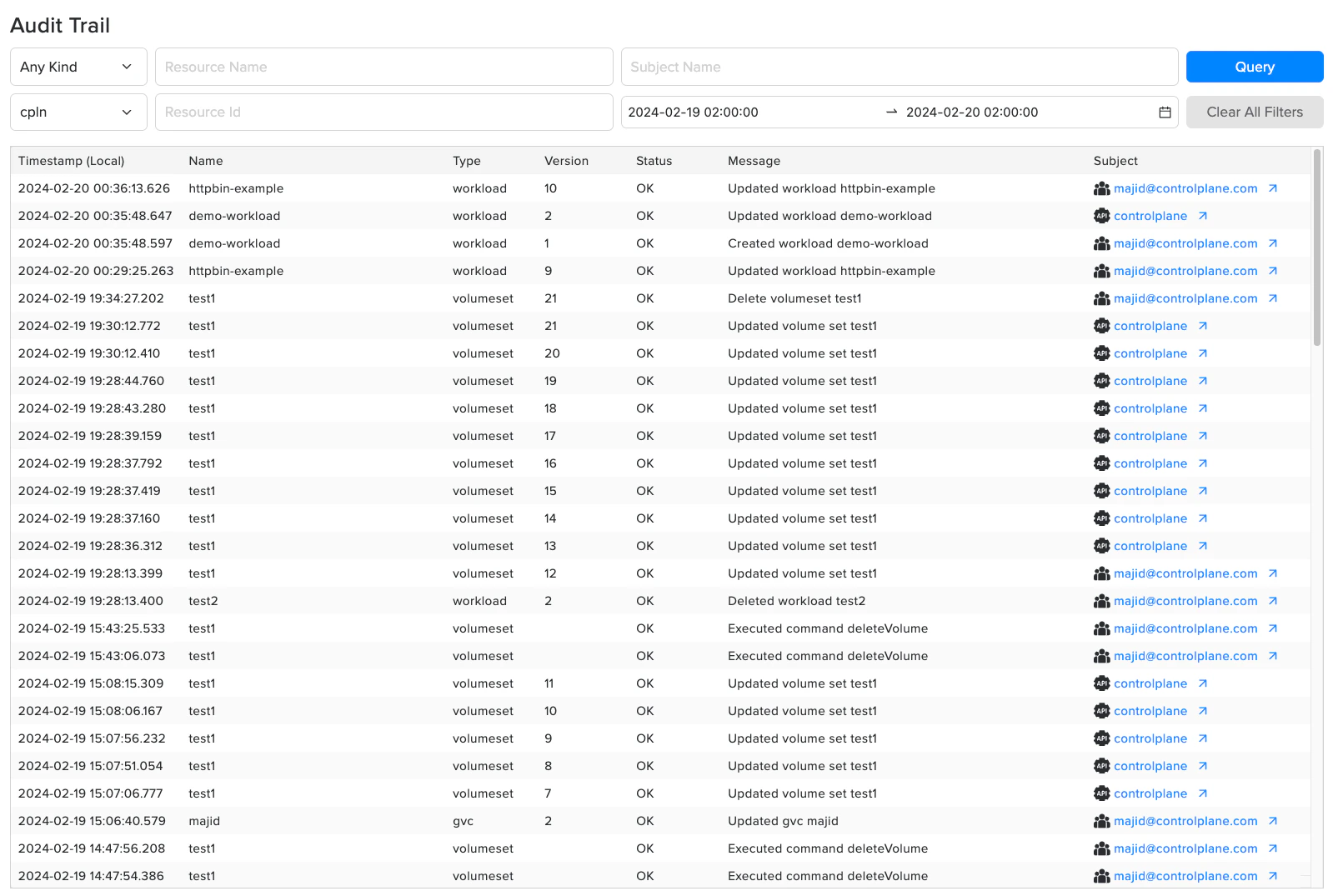
Custom Workloads
The audit trail architecture is generic and allows any workload to securely and reliably capture events. For a workload to use the audit trail, it must first create an audit context. Refer to the audit context reference page for additional details. COMING SOON: Detailed instructions for using the audit trail service in workloads.View Custom Audit Trail
To view the actions that have been captured by your workload, you can use:- Control Plane Audit Trail UI:
- You can select an audit context to only view those actions.
- Control Plane audit API:
- Leveraging the API, you can create a custom UI to display the audit data.
- View the Audit API OpenAPI spec to review the audit schema and available methods.